

Start live test
Open the FaceSign-hosted test service provider in a new tab, then start the sign-in.
What this test proves
The request starts at a service provider operated by FaceSign and returns to an ACS operated by FaceSign. Both ends are real: a real AuthnRequest, a real verification, real signed SAML. Between them, the deployed FaceSign IdP runs a live verification and issues signed SAML material. The loopback AuthnRequest carries the reserved.invalid synthetic Subject
loopback.user@example.invalid with NameID Format
urn:oasis:names:tc:SAML:1.1:nameid-format:emailAddress. On success, its ACS validates that exact
echoed NameID and the following two Attributes in FaceSign’s durable default correlation profile, both
with SAML Attribute NameFormat
urn:oasis:names:tc:SAML:2.0:attrname-format:unspecified:
http://schemas.xmlsoap.org/ws/2005/05/identity/claims/namehttp://schemas.xmlsoap.org/ws/2005/05/identity/claims/emailaddress
What can happen
Three outcomes, and the test is only meaningful if you have seen more than the first.
The fourth is the one integrators miss. The polling and the ACS POST both happen in the user’s
browser, so a closed tab, a dropped network, or a machine that goes to sleep delivers no response
at all — not a denial. Your integration needs its own timeout and fallback for that case; it is
not something the IdP can signal.
Run the accepted path
1
Launch the test SP
Open the live test above and select
Start live test.2
Allow camera access
Grant camera and microphone access when the browser asks. If another application owns the
camera, close it and try again. Both are released as soon as the session ends.
3
Follow the avatar
Follow the avatar’s spoken prompts and answer naturally. If a blocking camera issue is
detected, the avatar may speak a correction before you continue.
4
Confirm the result
After you explicitly confirm the intended action, the browser posts to the test SP’s ACS. The
ACS validates the response, saves a sanitized 24-hour recap, and redirects to its reloadable
result URL. Expect
Success, a signed Response, a signed Assertion, verified_human, the
exact synthetic NameID, all five facesign.* attributes, and both correlation
Attributes above.Expected result
The accepted result view looks like this, with its SAML disclosure expanded. The illustration is generated from the page’s own renderer using synthetic values.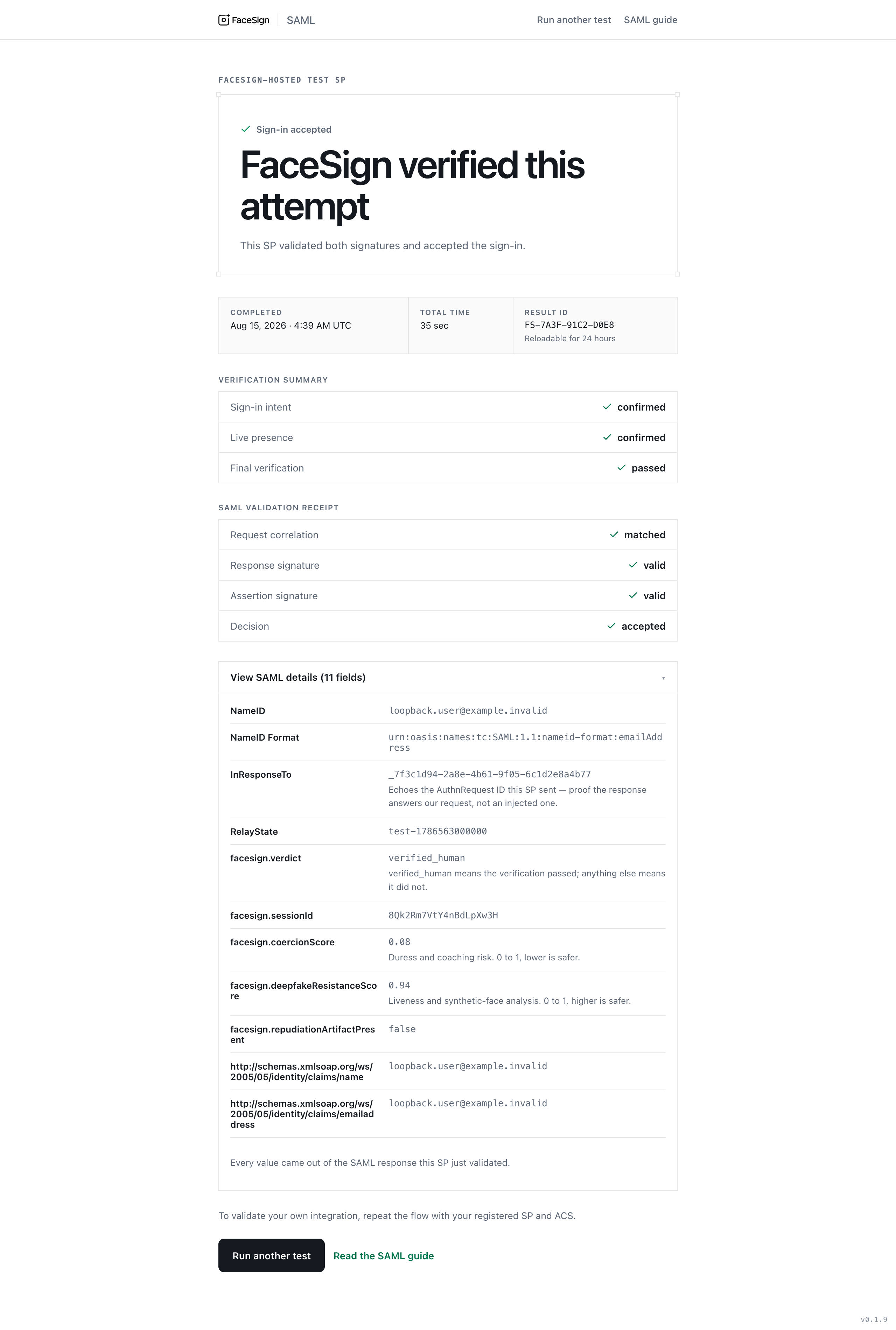
Example only. Every identifier and score in this image is synthetic. No person, tenant, request, or session data appears in it.
Run a deliberate non-pass
Start a fresh test and decline the intent confirmation. Expect a signed, status-only Response with top-levelResponder, nested AuthnFailed, and no Assertion. The test SP’s ACS validates the
denial as FaceSign-issued, then refuses the sign-in.
What can cause a denial?
A denial means the IdP would not vouch for the attempt. It is not an error, and it does not identify the person or accuse them of anything.- The person declined the intent confirmation, or gave no clear answer.
- A passive camera check did not pass. This runs silently and is not a challenge to answer.
- The session reached the IdP but did not complete, and the deadline passed.
- Analysis could not reach a verdict inside its deadline.